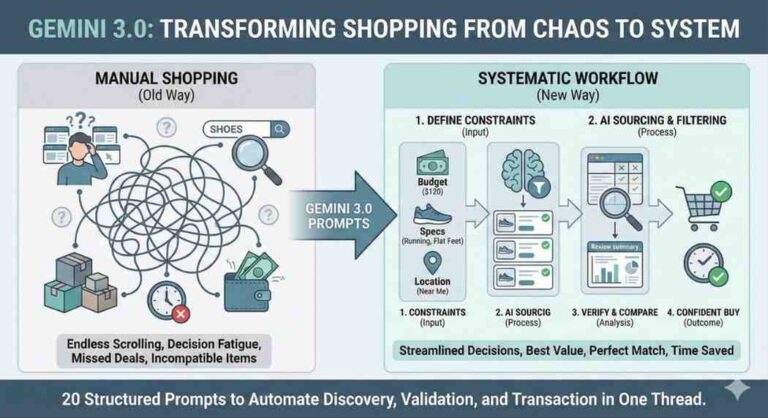
Saw the new “Shopping Research” popup in Gemini. I tested it, and it actually saves opening 50 tabs. Here is the workflow.
The new Gemini “Shopping Research” update allows you to go from idea to checkout in one thread without tab-switching. Below is a 3-step prompt stack to automate Christmas gifting.
Like many of you, I saw the “Shopping Research” popup recently and decided to actually push it to see if it’s useful or just a gimmick.
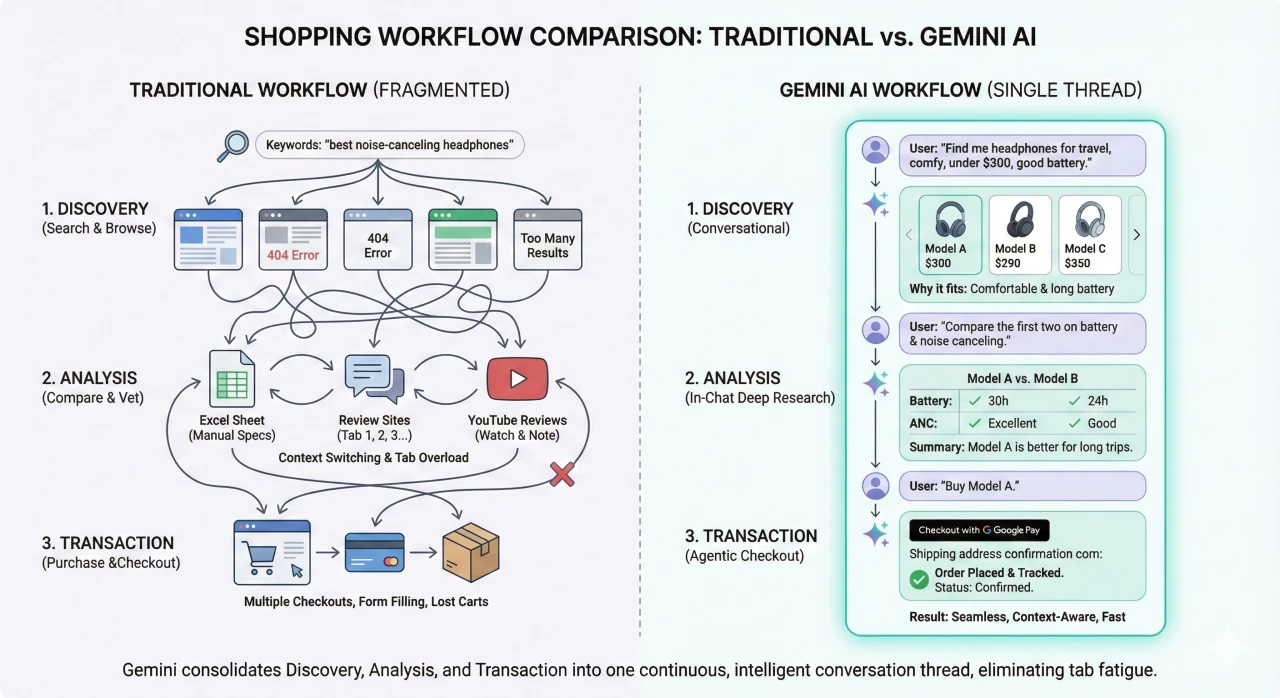
Usually, my holiday shopping involves: Google Search – 10 Tabs of Reviews, Reddit for “real” opinions, Amazon/BestBuy for price checks.
I realized Gemini can now handle this entire pipeline in a single thread using Google’s Shopping Graph + Deep Research agents. It filters the “noise” surprisingly well.
I built a workflow for this that I thought I’d share. It covers Discovery (finding the item), Analysis (vetting the reviews), and Transaction (finding the stock).
1. The “Agentic” Shopping Workflow
Copy-paste these in sequence. Don’t dump them all at once; let the model process each stage.
Phase 1: The Context & Discovery (Filtering the 50B products) Goal: Get curated options based on “vibes” and constraints, not just keywords.
Act as my expert Personal Shopping Agent. I have a total budget of [$500] to spend across [3] people. I need unique gift recommendations for:

1. [Name/Relation]: Loves [Interests, e.g., retro gaming, espresso]. They already own [Items to avoid].
2. [Name/Relation]: Hard to shop for, likes [Vibe, e.g., minimalist decor, brutalist architecture].

For each, suggest 3 distinct gift ideas. Prioritize items with 4.5+ star reviews and explain *why* it fits their personality.
Phase 2: The Deep Dive (The “Tab Killer”) Goal: Compare specs and check for fake review patterns without leaving the chat.
I like [Item A for Person 1] and [Item B for Person 2]. Perform a deep analysis:

1. Comparison Table: Compare [Item A] against its top 2 competitors on price, build quality, and "giftability".
2. Sentiment Check: Summarize the NEGATIVE reviews from verified buyers. What is the most common failure point? (Be specific).
3. Visuals: Show me what these look like.
Phase 3: The Logistics (Stock & Price) Goal: Find who actually has it.
I've decided on [Final Choice].

1. Find the Deal: Scour the web for the best current price.
2. Local Check: Check if any stores near [Zip Code] have this in stock for pickup.
3. Checkout: Provide the direct link to the merchant with the fastest shipping.
Why this works better than standard search
- Context Window: It remembers your budget from Step 1 while searching for prices in Step 3.
- Sentiment Analysis: In Step 2, asking for negative review summaries is a game changer. It usually flags things like “battery dies in 2 months” which you’d miss just skimming 5-star ratings.
Hope this saves you some stress (and open tabs) this month!
2. Tech purchases Workflow
Tech purchases are high-stakes and specification-heavy. This workflow leverages Gemini to act as a technical analyst, synthesizing benchmarks, forum discussions (like Reddit), and price history.
⚙️ The “Tech Specs” Deep Research Workflow
Buying tech usually means juggling YouTube reviews, benchmark sites, and manufacturer pages. This workflow consolidates that into a single thread, forcing Gemini to look for “deal-breakers” and hard data rather than just marketing fluff.
Instructions: Copy and paste these sequentially. Fill in the bracketed [ ] details.
1. Phase 1: Requirements & Filtering (The “System Builder”)
The goal is to filter the market based on your specific workflow, not just general “best of” lists.
Prompt: “Act as a Senior Tech Reviewer. I am looking to buy a [Product Category, e.g., Laptop / GPU / Monitor].
My Constraints:
- Primary Use Case: [e.g., 4K Video Editing, Competitive FPS Gaming, Coding].
- Budget: [Amount].
- Non-Negotiables: [e.g., Must have 32GB RAM, OLED screen, Battery > 10 hours].
Based on this, suggest the top 3 contenders currently on the market. For each, explicitly state the trade-off (what am I sacrificing by choosing this model?).”
2. Phase 2: Technical Analysis & “Reddit Check” (The “Stress Test”)
Tech specs on paper often differ from real-world performance. This phase digs into user experiences and benchmarks.
Prompt: “I am interested in [Model A] and [Model B]. Perform a deep technical comparison:
- Spec Table: Create a comparison table for: [Specific Metrics, e.g., Screen Refresh Rate, Port Selection, Weight, Geekbench Scores].
- The ‘Hidden’ Issues: Search forums (like r/gadgets or specialized tech forums) for common quality control issues. Are there reports of [Specific concerns, e.g., coil whine, thermal throttling, stick drift, dead pixels]?
- Longevity: Which of these has better long-term repairability or software support?”
3. Phase 3: Transaction & Price History (The “Smart Buy”)
Tech prices fluctuate wildly. This phase ensures you aren’t buying at an all-time high.
Prompt: “I’m going with [Winning Model].
- Price Check: Is the current price good compared to its historical average (last 3 months)?
- Merchant Vetting: Find a retailer that offers the best return policy or warranty for this specific item.
- Accessories: Are there any essential accessories (e.g., dongles, specific cables) that do not come in the box that I need to buy separately?”
💡 “Pro Tips” for Tech Research:
- The “Versus” Trick: If you are upgrading, tell Gemini what you currently own. Use the prompt: “Compare the performance jump from my current [Old Device Name] to the [New Device Name]. Is the percentage increase in speed worth the cost?”
- Manual Manuals: You can ask Gemini to check the PDF manual before you buy. “Check the user manual for [Device]. Does it support charging over USB-C or is it proprietary only?”
- Release Cycle Check: Always ask: “When is the successor to this product rumored to release?” Gemini can check news to save you from buying a phone 2 weeks before the new version drops.
3. ✈️ The “Agentic” Travel Planner Workflow
Planning a trip usually involves 20+ tabs (flights, hotel reviews, maps, blogs). This workflow forces Gemini to act as a Travel Agent + Data Analyst, validating prices, checking flight seat comfort, and summarizing thousands of hotel reviews into a “Deal Breaker” report.
Instructions: Ensure your Google Workspace extension is active (Settings – Extensions – Google Flights/Hotels/Maps turned ON). Copy and paste these prompts sequentially.
1. Phase 1: Discovery & Logistics (The “Flight Hacking”)
Goal: Find the best route, not just the cheapest one, by checking hidden factors like legroom and aircraft type.
Prompt: “Act as a Travel Expert. I want to plan a trip to [Destination] from [Origin] for [Number] days in [Month/Dates].
- Find Flights: Find the best non-stop (or 1-stop) flights.
- Comfort Check: For the top 3 options, identify the specific Aircraft Model (e.g., Boeing 777 vs Airbus A321). Which one has the widest economy seats and most legroom?
- Price Analysis: Is the current price high, low, or average for this time of year?”
2. Phase 2: Accommodation & Deep Analysis (The “Vibe Check”)
Goal: Read between the lines of 5-star reviews to find the actual problems (noise, construction, bed bugs).
Prompt: “I need a hotel in [Neighborhood/Area] for under [$Price]/night.
- The Shortlist: Suggest 3 hotels that fit this criteria.
- The ‘Deal Breaker’ Report: For these 3 hotels, analyze the lowest-rated reviews from the last 6 months. What are the consistent complaints? (Ignore one-off angry people; look for patterns like ‘thin walls’, ‘construction noise’, or ‘bad wifi’).
- Location: Show me a map of where they are relative to [Landmark/City Center].”
3. Phase 3: Itinerary & Transaction (The “Local Guide”)
Goal: Build a realistic schedule using Maps data to ensure you aren’t teleporting across the city.
Prompt: “I’m booking [Chosen Hotel]. Now build a 3-day itinerary:
- The Plan: Create a day-by-day plan. Group activities by neighborhood to minimize travel time.
- The Food: For dinner each night, suggest a highly-rated restaurant within a 15-minute walk of my last activity.
- Reality Check: Calculate the walking/driving distance between these stops. Is this itinerary actually feasible, or is it too rushed?”
💡 “Pro Tips” for Travel:
- The “Canvas” Trigger (US Only): If you are in the US, you can type “Create a travel canvas for Tokyo” to get a specialized side-by-side interface where you can drag and drop these results.
- Youtube Integration: Ask Gemini: “Find a 4K walking tour video of [Neighborhood] on YouTube so I can see if it feels safe at night.”
- Email Search: If you already have flight confirmations in your Gmail, you can ask: “Based on my flight confirmation to London in my email, suggest a packing list.”
I hope these three different workflows explain and help us in understanding the power behind Google Gemini’s powerful shopping research feature. It saves a lot time and hassles by integrating discovery, analysis, and transaction into a single thread.